Home Office Ergonomics: Reduce Back Pain by 20% with Simple Adjustments
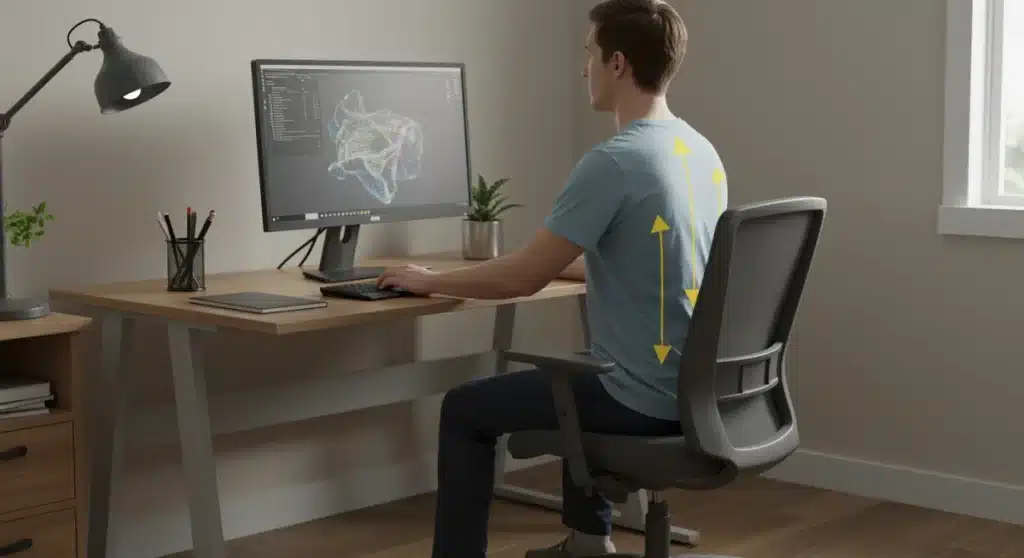
Optimizing home office ergonomics is crucial for well-being, directly impacting physical comfort and productivity. Simple adjustments to your workspace can lead to a significant reduction in back pain, enhancing overall health and focus.
Are you experiencing persistent discomfort while working from home? Many individuals struggle with aches and pains, particularly in their back, a common side effect of poorly configured workspaces. Understanding and implementing proper home office ergonomics can be a game-changer, potentially reducing back pain by 20% or more with just a few mindful adjustments. This guide will walk you through actionable steps to transform your home office into a haven of comfort and productivity.
Understanding the Root Causes of Home Office Back Pain
Working from home offers unparalleled flexibility, yet it often comes with the hidden cost of musculoskeletal issues, with back pain leading the charge. This isn’t just about discomfort; it impacts productivity, mood, and overall quality of life. Pinpointing the exact causes of this pain is the first step toward effective mitigation and creating a truly ergonomic workspace.
Often, the primary culprit is prolonged static posture. Sitting in one position for hours without adequate support or movement puts immense strain on the spine and surrounding muscles. Our bodies are designed for movement, and extended periods of inactivity can lead to muscle imbalances, stiffness, and reduced blood flow, all contributing factors to chronic back pain. Furthermore, the typical home office setup frequently lacks the ergonomic considerations found in professional environments, exacerbating these issues.
The Impact of Poor Posture
Poor posture is not merely about slouching; it encompasses a range of suboptimal body alignments that can stress the spine. When your back is rounded, your head is thrust forward, or your shoulders are hunched, the natural curves of your spine are compromised, leading to uneven pressure distribution. This can compress discs, strain ligaments, and cause muscles to work harder than necessary, resulting in pain.
- Slumped Shoulders: Puts strain on the upper back and neck.
- Rounded Lower Back: Compresses lumbar discs, leading to lower back pain.
- Forward Head Posture: Increases the perceived weight of the head, straining neck muscles.
Inadequate Equipment and Setup
Another significant factor is the use of non-ergonomic equipment. A standard dining chair, for example, is not designed to provide the lumbar support and adjustability required for extended periods of sitting. Similarly, laptop screens placed too low or too high force awkward neck angles, while keyboards and mice that are improperly positioned can lead to wrist and shoulder issues that radiate to the back. A lack of proper lighting can also cause eye strain, which in turn can lead to leaning forward and poor posture.
Recognizing these underlying issues is paramount. By understanding how your current setup might be contributing to your discomfort, you are better equipped to make informed changes. The goal is not just to alleviate existing pain but to prevent future occurrences by creating a supportive and dynamic work environment. Addressing these root causes through thoughtful ergonomic adjustments can significantly improve your comfort and long-term health.
The Cornerstone of Comfort: Your Ergonomic Chair
The chair you sit in is arguably the most critical component of your home office ergonomics. A well-chosen ergonomic chair can make a dramatic difference in preventing and alleviating back pain, providing the necessary support to maintain a healthy posture throughout your workday. Investing in a quality chair is an investment in your health and productivity.
An ergonomic chair is designed to support the natural curves of your spine, promoting a neutral posture that minimizes strain. Unlike standard chairs, it offers a multitude of adjustments, allowing you to customize it to your unique body shape and size. This adaptability is key to creating a truly personalized and supportive seating experience.
Key Features of an Ergonomic Chair
When selecting an ergonomic chair, look for specific features that contribute to optimal support and comfort. These features are not mere luxuries; they are essential for maintaining spinal health during long hours of sitting. Understanding what to prioritize will guide your decision-making process.
- Adjustable Lumbar Support: Crucial for supporting the natural inward curve of your lower back.
- Seat Height Adjustment: Allows your feet to be flat on the floor or a footrest, with knees at a 90-degree angle.
- Armrests: Adjustable armrests reduce strain on shoulders and neck, keeping them relaxed.
- Seat Depth Adjustment: Ensures 2-4 inches between the edge of the seat and the back of your knees.
- Backrest Recline: Helps vary posture throughout the day, relieving pressure on the spine.
Proper Chair Adjustment Techniques
Even the most advanced ergonomic chair is ineffective if not adjusted correctly. Taking the time to fine-tune each setting to your body’s specific needs is vital. Start by sitting all the way back in your chair, and then proceed with the adjustments in a systematic manner to ensure comprehensive support from head to toe.
First, adjust the seat height so your feet are flat on the floor or a footrest, and your knees are at approximately a 90-degree angle. This prevents pressure on the back of your thighs. Next, focus on lumbar support. Position it to fill the natural curve of your lower back. Then, adjust the seat depth so there are a few inches between the edge of the seat and the back of your knees. Finally, set the armrests to a height that allows your shoulders to relax, with your forearms parallel to the floor when typing. Regularly re-evaluating these settings can help you maintain optimal comfort and support as your needs or work activities change.
Optimizing Your Monitor, Keyboard, and Mouse Setup
Beyond your chair, the arrangement of your monitor, keyboard, and mouse plays a pivotal role in establishing effective home office ergonomics. These peripherals are your primary interfaces with your digital workspace, and their correct positioning can significantly impact your posture, reducing strain on your neck, shoulders, and wrists, which in turn alleviates back pain.
Many individuals overlook the importance of these seemingly minor details, often defaulting to a laptop-only setup that forces awkward angles. Elevating your monitor, using an external keyboard and mouse, and ensuring everything is within easy reach are simple yet powerful adjustments that contribute to a healthier work environment.
Monitor Placement for Neck and Eye Health
Incorrect monitor placement is a leading cause of neck strain and headaches, which can radiate down to the upper back. The goal is to position your screen so that your neck remains in a neutral, relaxed position, avoiding constant looking up, down, or to the side. This alignment is crucial for preventing chronic discomfort and maintaining visual comfort.
- Eye-Level Position: The top of your monitor screen should be at or slightly below eye level.
- Arm’s Length Distance: Position the monitor about an arm’s length away from you to minimize eye strain.
- Centered Screen: Ensure your primary monitor is directly in front of you to avoid twisting.
- Adjustable Stand: Use a monitor arm or stand to achieve the ideal height and distance.
Keyboard and Mouse: Precision and Comfort

The placement and type of your keyboard and mouse are critical for wrist health and can impact shoulder and upper back comfort. Awkward wrist angles or reaching too far for your peripherals can lead to repetitive strain injuries and secondary pain in other areas of the body. Proper positioning allows for relaxed shoulders and straight wrists.
Position your keyboard directly in front of you, centered with your body. Your wrists should be straight, not bent up or down, and your elbows should be at a 90- to 100-degree angle, close to your body. Consider an ergonomic keyboard that promotes a more natural hand position. For your mouse, keep it as close to your keyboard as possible to minimize reaching. An ergonomic mouse can further support a neutral wrist posture. Regularly assess your hand and arm position throughout the day to ensure you’re not tensing up or adopting poor habits. These small adjustments are vital for preventing strain and maintaining comfort during prolonged computer use.
The Importance of Movement and Micro-Breaks
While an ergonomically perfect setup is foundational, it’s not a complete solution without incorporating regular movement. Even the best chair and desk cannot fully counteract the negative effects of prolonged static postures. Integrating movement and micro-breaks into your workday is a non-negotiable aspect of effective home office ergonomics, significantly contributing to pain reduction and overall well-being.
Our bodies thrive on movement. Regular changes in posture and short breaks to stretch or walk stimulate blood flow, prevent muscle stiffness, and alleviate pressure on spinal discs. These small interruptions throughout the day can dramatically reduce the accumulation of tension that often leads to chronic back pain. Think of movement as an active component of your ergonomic strategy.
Scheduling Regular Micro-Breaks
The key to successful micro-breaks is consistency. It’s not about taking long, disruptive pauses, but rather frequent, short interruptions that allow your body to reset. Even a minute or two of movement every hour can make a significant difference. Utilize timers or apps to remind yourself to step away from your screen and move.
- Every 30-60 Minutes: Stand up, stretch, or walk for 1-2 minutes.
- Eye Breaks: Look away from your screen every 20 minutes for 20 seconds, focusing on something 20 feet away.
- Hydration Breaks: Use water breaks as an excuse to get up and walk to the kitchen.
Simple Desk Stretches for Back Relief

Incorporating simple stretches into your micro-breaks can target specific areas of tension, providing immediate relief and contributing to long-term flexibility. These stretches can often be performed right at your desk or nearby, requiring minimal disruption to your workflow.
Focus on stretches that gently extend your spine, open your chest, and release tension in your neck and shoulders. A simple seated cat-cow stretch can mobilize your spine, while shoulder rolls and neck tilts can alleviate upper body stiffness. Torso twists, performed gently, can also help release tension in the lower back. Remember to breathe deeply during each stretch and avoid any movements that cause sharp pain. Consistency with these short stretching routines can improve circulation, reduce muscle fatigue, and significantly contribute to a more comfortable and pain-free workday. These active interventions complement your ergonomic setup, creating a holistic approach to preventing and managing back pain.
Lighting, Glare, and Environmental Factors
While often overlooked, the ambient environment of your home office plays a crucial role in overall comfort and can indirectly impact musculoskeletal health. Factors such as lighting, glare, and even room temperature are integral to comprehensive home office ergonomics. Addressing these elements contributes to reduced eye strain, improved focus, and a more pleasant work experience, all of which support better posture and less back pain.
Poor lighting can lead to squinting and leaning forward, positions that strain the neck and upper back. Glare on your screen can cause eye fatigue, prompting you to adopt awkward postures to compensate. Creating an optimal visual and thermal environment ensures that your body isn’t unconsciously tensing up or contorting to adapt to suboptimal conditions.
Optimizing Lighting to Prevent Strain
Effective lighting is about balance and consistency. Too little light forces your eyes to work harder, while too much can create glare. The ideal setup minimizes shadows and provides a uniform illumination that supports visual comfort without causing discomfort. Natural light is often the best option, but it needs to be managed correctly.
- Natural Light: Position your desk to the side of a window, not directly facing or with your back to it, to minimize glare.
- Task Lighting: Use an adjustable desk lamp to illuminate your workspace without creating screen glare.
- Ambient Lighting: Ensure overall room lighting is adequate and evenly distributed to reduce contrast.
- Avoid Overhead Glare: Be mindful of overhead lights that might reflect off your screen.
Managing Glare and Screen Brightness
Glare is a significant contributor to eye strain and can lead to compensatory postures that stress your back. It occurs when light reflects off your screen or other surfaces, making it difficult to see clearly. Managing glare involves a combination of screen adjustments and environmental controls.
Adjust your monitor’s brightness and contrast to match the ambient lighting of your room. Anti-glare screens or filters can be highly effective in reducing reflections. If working near a window, use blinds or curtains to control direct sunlight. Additionally, consider the color scheme of your workspace; lighter colors on walls and surfaces can reflect light, potentially increasing glare, while darker, matte finishes absorb it. By carefully managing these environmental factors, you create a visual oasis that reduces strain on your eyes and neck, promoting a more relaxed and ergonomically sound posture, thereby indirectly reducing the likelihood of back pain.
Advanced Ergonomic Tools and Accessories
Once you’ve established the fundamental aspects of home office ergonomics, exploring advanced tools and accessories can further enhance your comfort and pain prevention strategies. These supplementary items are designed to address specific ergonomic challenges and provide additional support, taking your workspace optimization to the next level. While not strictly necessary for everyone, they can be invaluable for those seeking maximum comfort or dealing with persistent issues.
These tools often focus on promoting dynamic sitting, reducing repetitive strain, or providing targeted support for areas prone to discomfort. They represent an evolution in ergonomic design, offering solutions that go beyond the basic chair and desk setup, allowing for a more nuanced approach to personal comfort and health.
Standing Desks and Desk Converters
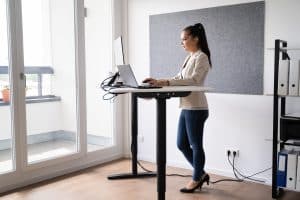
The concept of a standing desk has gained significant traction due to its ability to combat the negative effects of prolonged sitting. Alternating between sitting and standing throughout the day promotes movement, improves circulation, and can significantly reduce back pain by varying the load on your spine. They offer a dynamic approach to work that aligns with our bodies’ natural need for movement.
- Full Standing Desks: Allow for seamless height adjustment, often motorized, for sitting and standing.
- Desk Converters: Sit on top of your existing desk, offering an affordable way to alternate positions.
- Benefits: Reduce sedentary time, improve posture, and alleviate lower back pain.
Ergonomic Keyboards, Mice, and Footrests
Beyond the basics, specialized ergonomic peripherals can provide targeted relief and support. These are particularly beneficial for individuals experiencing wrist pain, carpal tunnel syndrome, or those who find conventional peripherals uncomfortable. They are designed to align with the natural contours of your body, reducing strain and promoting healthier habits.
Ergonomic keyboards often feature a split design or a contoured shape to keep your wrists in a neutral position. Similarly, ergonomic mice are shaped to fit your hand more naturally, reducing pronation and wrist extension. A footrest is another simple yet effective accessory, especially for shorter individuals, ensuring proper leg and foot support when sitting. It helps maintain the correct knee angle and reduces pressure on the lower back. When combined, these tools create a highly supportive and adaptable workspace, minimizing the risk of discomfort and maximizing your ability to work comfortably for extended periods.
Maintaining Ergonomic Habits for Long-Term Health
Implementing initial ergonomic adjustments is a fantastic start, but the true measure of success in home office ergonomics lies in maintaining these habits consistently over time. Ergonomics isn’t a one-time fix; it’s an ongoing practice that requires conscious effort and regular self-assessment to ensure long-term health and prevent the recurrence of back pain. Building new habits takes time and dedication, but the benefits are well worth the effort.
Your body and your work environment are dynamic. What feels comfortable today might need slight adjustments tomorrow. Regularly checking in with your body and your setup helps you adapt to changes and reinforces positive ergonomic behaviors. This proactive approach ensures that your home office remains a supportive and pain-free space.
Regular Self-Assessment and Adjustment
Periodically review your posture and workspace setup. Are you still sitting correctly? Is your monitor at the right height? Are you taking enough breaks? These questions should become part of your routine. Think of it as a personal ergonomic audit that helps you stay on track and make necessary tweaks.
- Daily Check-ins: Start your day with a quick posture check and equipment review.
- Listen to Your Body: Pay attention to any new aches or discomfort; they are signals to adjust something.
- Seek Feedback: If possible, ask a family member to observe your posture during work.
Integrating Movement into Your Daily Routine
Beyond scheduled micro-breaks, look for opportunities to incorporate movement into your overall daily routine. This could mean taking short walks before or after work, doing a few stretches during your lunch break, or even standing up to take phone calls. The more varied your movements throughout the day, the better your body will feel.
Consider incorporating a short exercise routine that strengthens core muscles, as a strong core provides essential support for your spine. Yoga or Pilates, even for just 10-15 minutes a day, can significantly improve flexibility and muscle balance. Remember that consistency is more important than intensity when it comes to maintaining long-term ergonomic health. By making these practices an integral part of your daily life, you’re not just preventing back pain; you’re cultivating a healthier, more resilient body that can better withstand the demands of a home office environment. This holistic approach ensures that the benefits of your ergonomic adjustments are sustained, leading to lasting comfort and well-being.
| Key Ergonomic Adjustment | Brief Description |
|---|---|
| Ergonomic Chair | Provides adjustable lumbar support, seat height, and armrests for optimal spinal alignment. |
| Monitor Placement | Top of screen at eye level, arm’s length distance, to prevent neck strain. |
| Movement & Breaks | Regular micro-breaks and stretches every 30-60 minutes to prevent stiffness. |
| Lighting & Glare | Optimize natural and artificial light to minimize eye strain and avoid screen glare. |
Frequently Asked Questions About Home Office Ergonomics
Ideally, you should adjust your ergonomic chair whenever you feel discomfort or change your posture. A good practice is to perform a quick check at the start of each workday to ensure all settings are optimal for your current needs and body alignment.
Yes, a standing desk can significantly help reduce back pain by allowing you to alternate between sitting and standing. This variation in posture reduces prolonged static load on your spine, improves circulation, and strengthens core muscles, leading to less discomfort over time.
The ideal monitor height is when the top of your screen is at or slightly below eye level. This position ensures your neck remains in a neutral, relaxed posture, minimizing strain and preventing forward head posture, which can contribute to upper back pain.
Position your desk to the side of a window to utilize natural light without glare. Supplement with task lighting from an adjustable desk lamp. Ensure overall room lighting is balanced to avoid harsh contrasts, reducing eye fatigue and its related postural issues.
Absolutely. Frequent micro-breaks, even just 1-2 minutes every hour, are highly effective. They prevent muscle stiffness, promote blood circulation, and relieve pressure on spinal discs, all of which are crucial in preventing the accumulation of tension that leads to chronic back pain.
Conclusion
Embracing proper home office ergonomics is more than just a trend; it’s a fundamental shift towards a healthier, more sustainable way of working from home. By meticulously adjusting your chair, optimizing your monitor and peripherals, integrating regular movement, and fine-tuning your environmental factors, you can significantly reduce back pain and enhance your overall well-being. These simple yet powerful adjustments not only alleviate existing discomfort but also serve as a proactive measure against future musculoskeletal issues, ensuring that your home office remains a productive and pain-free space. Prioritizing ergonomics is an investment in your long-term health, allowing you to thrive in your remote work journey with comfort and vitality.